This tutorial guides you how to install multi core Solr on Ubuntu. I found this installation quite difficult because of lack of documentation. I did google research and found few useful documents. It can be found at the end of this tutorial under reference section.
Pre requirements for solr :-
- servlet container such as tomcat,jetty etc.
solr environment :-
- solr version – solr-4.8.1.tgz
- jetty version – which comes with above solr version
Installing Solr
1) Download latest solr version.
https://lucene.apache.org/solr/downloads.html
2) Extract it and copy example folder to /opt/solr
tar -xvf solr-4.8.1.tgz

cp -R solr-4.8.1/example /opt/solr
3) Edit default jetty
vim /etc/default/jetty
#here use multi core

JAVA_OPTIONS="-Dsolr.solr.home=/opt/solr/multicore $JAVA_OPTIONS";

JETTY_HOME=/opt/solr

JETTY_LOGS=/opt/solr/logs

JETTY_USER=solr


# Use 0.0.0.0 as host to accept all connections. (restrict it only to localhost by adding 127.0.0.1 )

#here jetty was deployed on remote server

JETTY_HOST=0.0.0.0
4) create the Solr user and grant it permissions
sudo useradd -d /opt/solr -s /sbin/false solr
sudo chown solr:solr -R /opt/solr
5) automatically start jetty on startup (optional)
sudo wget -O /etc/init.d/jetty http://dev.eclipse.org/svnroot/rt/org.eclipse.jetty/jetty/trunk/jetty-distribution/src/main/resources/bin/jetty.sh
sudo chmod a+x /etc/init.d/jetty
sudo update-rc.d jetty defaults
6) start the solr by starting jetty
sudo /etc/init.d/jetty start
7) Access the solr through the web browser
http://:8983/solr
Add new core/Multicore
Configure multi core solr
1) Copy/duplicate existing core
cd /opt/solr/multicore

sudo  mkdir testcore

sudo  mkdir testcore/data

cp -R core0/conf testcore
2) Grant the ownership of testcore to the solr user
sudo chown -R solr:solr testcore
3) Add new core
go to solr home page
http://:8983/solr
4) Click “Core Admin” –> ” Add core” to add new core
Fill the pop up with the appropriate information
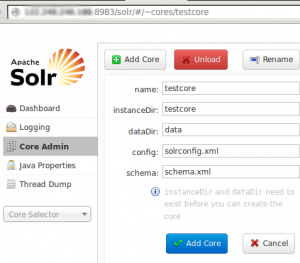
configure multicore on solr
After creating multi core named “testcore”

solr multicore
5) Edit solr.xml file
Add following line to multicore/solr.xml file to make visible the new core after jetty restart. Otherwise every time you are to add new cores once the jetty restarts. It is painful.
<core name="testcore" instanceDir="testcore">;
Following lines are already added to multicore/solr.xml for default cores
<core name="core0" instanceDir="core0">
<core name="core1" instanceDir="core1">
Secure the Solr
How to secure the Solr running on jetty or any other servlet container, can be found from here
Reference
1) https://www.digitalocean.com/community/tutorials/how-to-install-solr-on-ubuntu-14-04
2) http://docs.ckan.org/en/latest/maintaining/solr-multicore.html
3) https://cwiki.apache.org/confluence/display/solr/Moving+to+the+New+solr.xml+Format


