Mar 03

How to add banner to WordPress header

This article guides how to add banner to WordPress header section of Graphene theme enabled site.
It is really simple, no need to modify existing source code or does not require PHP knowledge at all. So let’s look at hot to do it.

1) Go “Appearance” –> “Graphene Options” and select “Advanced” tab. Under that section, you can find “Action Hooks Widget Areas“, and toggle / expand it.
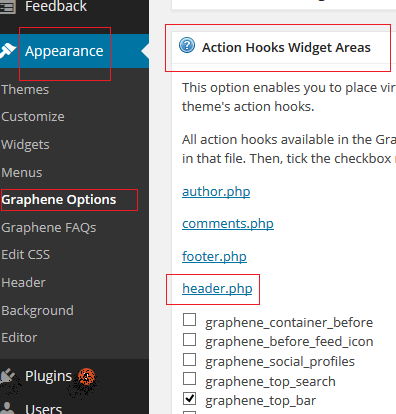
Graphene theme - Action Hooks Widget Areas


2) Find the header.php and tick the “graphene_top_bar” as going to positioned the banner at top of WordPress logo . You can find all Graphene Action Hooks Map from here  .It has ton of method to customize the WordPress.

3) when you go to “widgets“, new section called “Graphene Top Bar”  appears left hand side of the panel. you can drag and drop any widgets as you wish !.  So, I added “Text” widget and fill the title with some words such as “testing123” etc. This is be useful to find the widget ID later.


4) To figure out widget ID, open your WordPress home page, right click on free area and open “view page source“. page source will open on new window. you need to press “CTRL” + “F” key to get the search box. Enter the text which you have put on previous step (“testing123”). you can find the widget ID easily as below image.


Wordpress widget ID


5) Now again go to “Graphene Options” and Click on “Display” from tab section. Then find and toggle “Custom CSS” at the bottom.add similar css code as below but remember to change “text-6” according to your widget ID. here I used text widget and it’s ID was “text-6”. In your case it will be totally different.

#text-6{
width: 740px;
height: 115px;
float: left;
}

6) That’s all. comments if there any doubts or need any help. Below is the preview of it.

Wordpress Graphene top banner advertisement


References:-
http://docs.graphene-theme.com/Action_Hooks_Widget_Areas

Feb 27

Amazon Simple Work Flow – shortnote

When I studied for AWS Certified Solution Architecture – Associated exam, both SQS and SWF ( amazon simple work flow ) were little hard for me. After reading numerous online resources and following video tutorials I was able to grab the concept of these two services. So I thought to blog the basic of serive here as a study note. I strongly encourage you to read AWS docs, specially FAQ section (you can learn lot from there) and white papers, If you are planning to take  AWS Certified Solution Architecture – Associated exam. you can find my previous SQS post here.

Basic description of SWF :-  Another distributed service from AWS like SQS. Simple work Flow service is task coordination and state management service for cloud applications.

Features
* Distributed

* Highly scalable

* works with non cloud(local) application or applications in the cloud

* A workflow can consist of human events
ex:- purchased item shipping process at eCommerce web site, such as amazon.com , eBay etc…

* A workflow execution can last up to 1 year

* Guarantees order in which activities / task occur
this is important, SWF guarantees the task order, that SQS DOES NOT.


Compare SQS and SWF

* Both are used to create distributed systems
* Both allow for each “task / component” of the system to be scaled separately
* SQS does have a “best effort” message order (no guarantee about  order) and potentially has duplicates.
* SWF guarantees execution order and uses deciders for next instructions.
* SWF can have a human task as part of the work flow while SQS does not
* SQS message live up to 14 days, but SWF task execution task can last up to 1 year.
* SWF allows for synchronous or asynchronous distributed processing.


Related post :- Amazon Simple Queue Service


Feb 24

Amazon Simple Queue Service – shortnote

If you are interested at cloud computing, Amazon web service is not a new term for sure 🙂 .
Here, I thought to make blog post about one of AWS service called as Simple Queue Service abbreviated as SQS. This would be useful as aws exam short-note, and also understanding basic concept of SQS.

Queues store messages that are generated from one component of application and consumed(read) by another.
This is called as decouple infrastructure because each component of the system is functioning independently.

Important!

Core features

* Delay queue
Delivery of a message is delayed for the specific amount of time.

* Access control
It is possible to control who can retrieve / send message

* Guarantees delivery of “at least” 1 message.
But doesn’t guarantee the order, so it’s up to developer to implement such a feature if required.
SWF (Simple Work Flow) does guarantee the order of delivery.

* Multiple writers and readers
Multiple readers / writers can access the queue concurrently. SQS locks the message during the processing.

* Variable message size
– message size is up to 256Kb, but single request is 64Kb.
so 256Kb message require 4 requests
– message can contain instruction to access other aws service such as s3, dynamoDB etc.

* Visibility timeout
message is being processed, and no other process can poll the message until timeout period expires.

Polling types

[1] Short polling
* Default polling
* Continuous short polling should be performed to ensure all messages are recived.
* so this is not cheap (due to above statement)

[2] Long polling
* reduce empty responses
* wait until a message is available before sending response.
* respond at lease 1 message
* reduce the cost

Notice

Receive message wait time – If this is set to a value greater than 0, then long polling is enabled.


Important!

Important  SQS Timers


Timer minimum value maximum value
Delay queue 0 seconds 15 minutes
message retention (default 4 days) 1 minute 14 days
Visibility timeout 0 seconds 12 hours


So see you guys with  Amazon Simple Work Flow ( SWF ) article.

References :-

[1] http://aws.amazon.com/sqs/faqs/


Older posts «

» Newer posts

Fetch more items